Craig Mercure
Everyone wants a seamless experience while streaming their favorite shows/movies on Netflix. Yet, it’s also a reality that many viewers face issues… This includes buffering, poor quality video/audio, and so on. These issues can be frustrating & make anyone give up watching the content.
One thing many people don’t know is that they can easily fix the buffering & other issues to improve their Netflix streaming quality. So in this guide, we will share six tips on how to improve Netflix streaming quality on TV, game console, or mobile/tablet.
1. Choose the Right Netflix Plan
Before you start tweaking your network settings or something else, you need to know this… The Netflix streaming quality depends on your subscription plan.
The standard plan is capped at HD (1080p), while the Premium plan offers 4K UHD + HDR. So, if you want the best streaming quality, buy a Netflix premium account from u7buy.com.
4K UHD gives 4x the resolution of HD… You know what this means? Sharp details, deep contrast, and very vivid colors. The difference in quality becomes clear when you are watching on a large screen.
So if you already have fast internet and a modern display, choosing premium can instantly improve streaming quality.
2. Check your Internet Speed
A strong internet connection serves as the foundation block for streaming. So any time the internet speed falls below the thresholds, Netflix will automatically switch to lower video quality.
So, your internet speed is to blame if you have ever seen a dip in video quality during playing. These are the minimum speeds for different resolutions:
- SD (3 Mbps)
- HD (5 Mbps)
- 4K UHD (15 Mbps)
A lot of streaming experts also suggest 25 Mbps or more for 4K if you are in a household with more than one active user.
You can use tools like “Fast internet speed check” to find your actual internet speed. This tool is operated by Netflix and tells you the download speed you are getting for the Netflix servers.
And if your speed is insufficient, then you should consider upgrading as that’s the only way to enjoy high quality streaming with no buffering or pixelated videos.
3. Be Aware of ISP Throttling
ISP throttling isn’t a fancy word that someone made up… It is a totally real thing in which the ISPs throttle your speed for certain sites (Netflix) and traffic types.
So, if your internet plan promises high speeds yet you are facing issues, there’s a chance that the ISP is intentionally slowing video streaming. This normally happens during the peak hours or when a user has reached the data limit.
According to a study, around 40% of US broadband users face some form of data cap or traffic management.
The solution is very simple:- Upgrade to an unlimited plan to avoid low video quality while streaming. If you see no improvements, then switch to a different internet provider that doesn’t throttle your connection to Netflix.
4. Update Your Device and App
Another thing that can impact the streaming quality on Netflix is an outdated app/device. From old video compression technology to security vulnerabilities to bugs, all of them can cause buffering and lag.
Netflix regularly updates the app to improve performance… A good example of this is new codecs AV1, which consumes 30 – 40% less bandwidth while delivering high-quality visuals.
So if you want to improve the Netflix streaming, then update your device as well as the Netflix app. In addition, remember to restart your device every now and then to clear the temp cache as that can also cause performance issues.
5. Adjust Playback Settings
If your internet speed is fine & everything else also checks out, then it is time to review Netflix playback settings. Although rare, the automatic system of Netflix can make a mistake and mess up the playback settings.
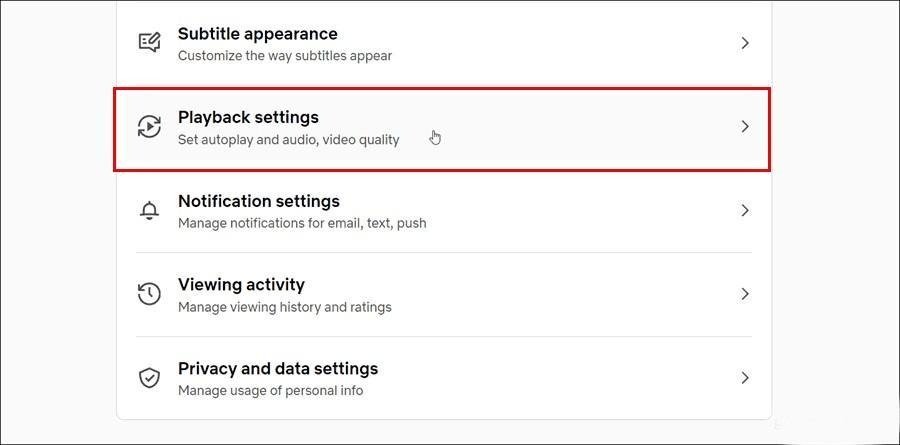
You can change these settings on Netflix:
- Go to Account.
- Tap on Playback Settings.
- Select the “high” option.
But you should remember that higher video output uses more data. Streaming in HD quality for one hour consumes 3 GB, while 4K UHD can consume around 7 GB. So it is also best to have an unlimited data plan to avoid any decline in the streaming quality.
6. Clear App Cache
How long have you been streaming on Netflix? A few months or years? Here’s the thing… Netflix app accumulates cached data over time which can slow the performance and cause playback issues.
So, another quick fix is to clear the app cache and that should be enough to keep the Netflix running smoothly & improve streaming quality.
On smartphones/tablets, go to App Settings > clear cache or the clear storage option. On TV + other similar devices, check the system or app settings to delete cache files.
After the cache is deleted, restart the device > log out > log in to Netflix again. And for the next time, make it a habit to routinely clear the cache as that is proven to improve the streaming quality on Netflix.